HTML-in-Canvas is big news because it solves one of the worst tradeoffs in web development: canvas gives you powerful rendering, but once you draw your UI there, you lose a lot of normal browser behavior.
Chrome's experimental origin trial points toward a better model where a canvas app can draw real HTML elements while keeping browser-managed text, controls, focus, accessibility, and interaction.
That is much bigger than "now you can put a div in a canvas." The real story is that developers may no longer have to rebuild pieces of the browser inside their own rendering engine.
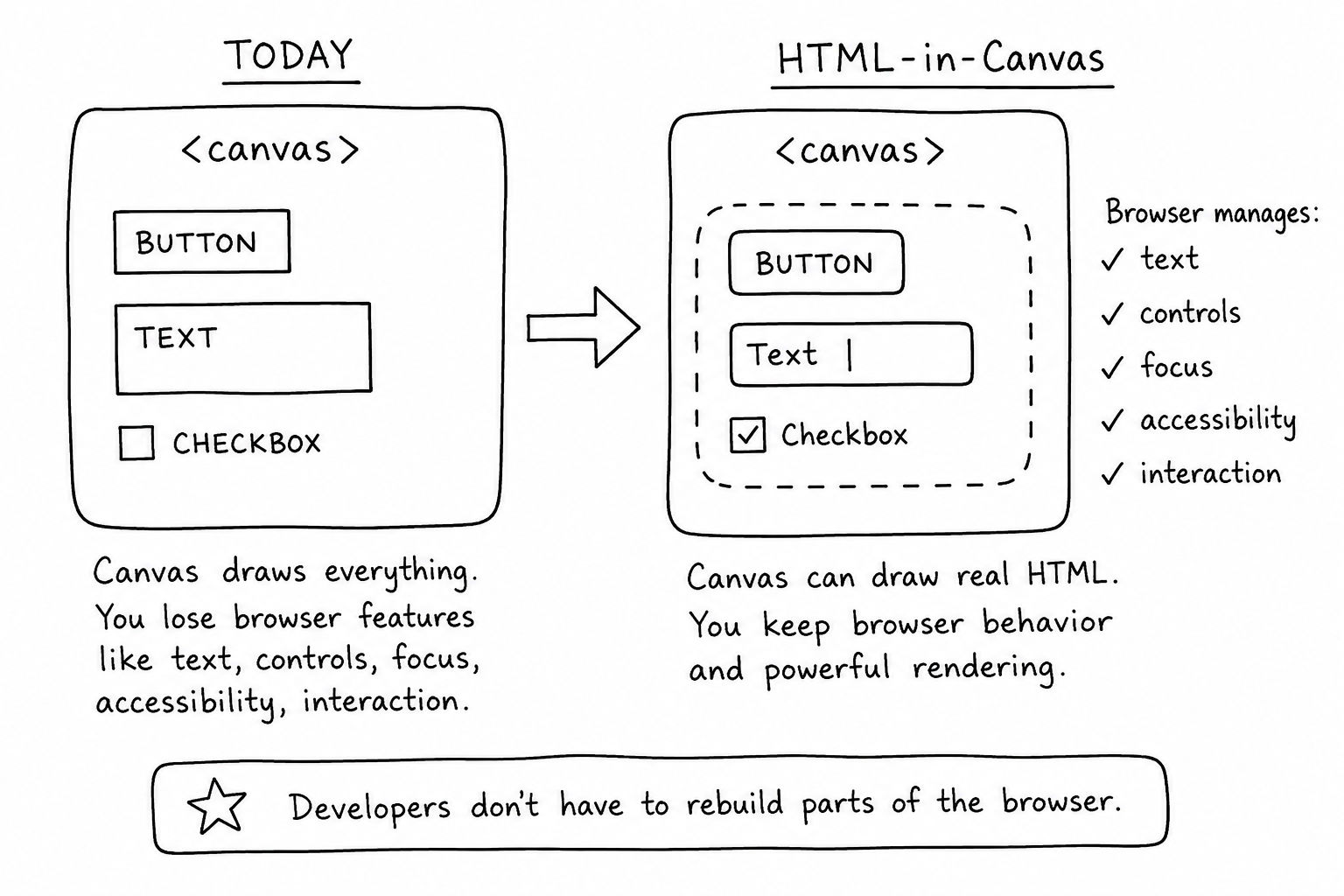
Canvas Apps Have Been Paying For The Same Problem For Years
Canvas is the right tool for plenty of interfaces. Charts, whiteboards, games, design tools, simulations, video editors, CAD-like tools, and 3D scenes often need direct control over pixels or textures.
The trouble starts when those apps need ordinary UI features.
A label needs text layout. A form field needs focus, keyboard input, autofill rules, and mobile behavior. Selectable text needs selection, copy, find-in-page, zoom behavior, and accessibility. A button needs pointer events, keyboard activation, hover states, focus indicators, and semantics.
If you draw those things manually, you own all of that behavior.
That is why many serious canvas apps end up with awkward hybrid layers. The canvas draws the main workspace. HTML elements float above it for inputs, menus, tooltips, labels, and accessibility. Then the team spends years keeping the HTML layer lined up with the graphics layer.
If you have worked on chart labels or legends before, you have seen a smaller version of this. Even a normal chart, like the kind you might build after reading a Chart.js pie chart tutorial, is not only about drawing arcs. Real users need labels that are readable, selectable, responsive, and testable.
HTML-in-Canvas is interesting because it tries to make that split less painful.
What The Feature Actually Does
The proposed model lets a <canvas> lay out child DOM nodes, then draw those elements into the canvas output. Chrome's origin trial focuses on three practical phases:
- add
layoutsubtree to the <canvas>
- draw a direct child during the
paint event with drawElementImage()
- apply the returned transform to the element's
style.transform so interaction lines up with what was drawn
The small 2D shape looks like this:
<canvas id="scene" width="600" height="400" layoutsubtree>
  <button id="cta">Continue</button>
</canvas>
const canvas = document.querySelector("#scene");
const button = document.querySelector("#cta");
const ctx = canvas.getContext("2d");

canvas.onpaint = () => {
  const transform = ctx.drawElementImage(button, 40, 40);
  button.style.transform = transform.toString();
};
That transform line is the important part. This is not supposed to be a dead screenshot of HTML. The browser still needs to know where the element is so clicks, focus, accessibility, and other interactions match the rendered result.
Chrome also documents WebGL and WebGPU paths: texElementImage2D() for WebGL, copyElementImageToTexture() for WebGPU, and getElementTransform() for computing transforms in 3D placement.
That is where the feature starts to feel much bigger than a 2D canvas helper.
The Big News Is Browser Behavior, Not Drawing
Drawing HTML into a canvas sounds visually useful, but the real win is preserving behavior.
A canvas-only text field is usually not a real text field. It is a rectangle plus a custom text editor. If you want it to behave like an input, you need to rebuild editing, keyboard handling, accessibility, mobile quirks, selection, clipboard behavior, and edge cases you will not remember until users hit them.
That is a lot of code to write just because the UI lives inside a canvas scene.
HTML-in-Canvas changes the conversation. If the browser can keep managing the HTML while the app draws it into a canvas or texture, then developers can use the DOM for the pieces where the DOM is still the better tool.
Think about an in-game settings panel, a 3D product configurator label, a whiteboard sticky note, a node editor property field, or a design tool inspector. Those should not require every team to invent a private form system.
Even simple JavaScript game interfaces run into this. A card project like coding a card deck in JavaScript can start with normal DOM. But once the app moves toward canvas or WebGL, the ordinary parts of the UI become harder than they should be.
HTML-in-Canvas is exciting because it says: keep the high-performance graphics path, but stop pretending HTML controls are just pixels.
It Could Reduce Duplicate UI Layers
The most practical near-term benefit is not flashy. It is less duplicated UI.
Today, a canvas-heavy app often has two versions of the same thing:
- a visual version drawn into the canvas
- a DOM version used for input, accessibility, search, or overlays
Those layers drift. The canvas position changes but the DOM overlay misses by a few pixels. A zoom transform updates one layer but not the other. A screen reader label no longer matches what the canvas shows. A context menu opens in the wrong place. A test clicks the visible thing and hits the invisible thing.
HTML-in-Canvas does not magically remove all coordination work, because the transform still needs to be kept aligned. But it gives that coordination an actual browser API instead of leaving every team to improvise.
That matters for maintainability. A feature that removes a fake input implementation, a separate overlay positioning system, or a custom text selection model can delete a lot of bug-prone code.
It Also Matters For 3D UI
The 3D angle might become the most interesting part.
WebGL and WebGPU scenes have always had an awkward relationship with HTML. If you want a real form, you usually put DOM above the canvas. If you want the UI to live inside the scene, you render a texture and lose most normal browser behavior.
HTML-in-Canvas creates a possible middle path: real HTML as a texture, with interaction kept in sync.
That could matter for:
- WebXR-style panels
- game menus
- 3D documentation or book interfaces
- product configurators
- data visualization labels
- visual programming tools
- collaborative canvases
Nobody should treat this as production-stable yet, but the direction is important. The web has needed a better bridge between DOM UI and graphics scenes for a long time.
Do Not Rewrite Normal Pages Around It
The wrong takeaway is "HTML belongs inside canvas now."
It does not.
If you are building a standard content page, admin panel, checkout flow, dashboard, or CRUD app, regular HTML and CSS are still the right default. The browser already gives you layout, responsiveness, accessibility, forms, search, extensions, printing, translations, and DevTools.
HTML-in-Canvas is for apps where canvas is already justified.
Use it when the canvas is the main area users manipulate: editors, whiteboards, drawing tools, 3D scenes, graph tools, games, map-like interfaces, or dense visual workspaces. In those apps, the API can let you bring specific HTML pieces into the graphics path without throwing away browser behavior.
That distinction matters. The feature is a bridge, not a recommendation to hide your website inside a bitmap.
The Limits Are Part Of The Story
This is experimental. Chrome says the origin trial is for Chrome 148 through 150, and local testing uses Chrome Canary 149 or later with chrome://flags/#canvas-draw-element enabled.
The security limits also matter. The API gives canvas code access to rendered DOM output, so sources are careful about what should not be exposed. Cross-origin iframe content is restricted, and the WICG security notes call out sensitive data such as visited link information, spellcheck information, and autofill previews.
There are performance and update-model concerns too. If content inside the canvas depends on JavaScript-driven painting, scrolling and animation behavior can differ from normal DOM updates.
So the practical advice is boring and correct: prototype, measure, and test interactions in the browser you plan to support. Treat this like any other experimental browser feature.
My Take
HTML-in-Canvas is big news because it attacks a real architectural pain point. Canvas apps have always wanted the power of custom rendering without losing the browser's built-in UI behavior. This feature is one of the clearest attempts to connect those worlds.
It is not ready to become a default pattern for normal web apps. It is experimental, available through Chrome's origin trial, and still needs careful security, performance, and compatibility testing.
But if your product already depends on canvas, WebGL, or WebGPU, this is worth watching closely. The best version of this feature could let teams delete custom UI code, reduce overlay bugs, improve accessibility, and build richer visual interfaces without writing a miniature browser themselves.
That is why it matters.
Sources